
Product published by MSDP
FlyMate
FlyMate is the management platform for approved (ATO) and declared (DTO) aviation training organisations. Its modules cover the whole operation: booking, training records, licences, fleet, maintenance, controlled manuals, compliance, safety, accounting and reporting.
In brief
An aviation training organisation juggles aircraft, instructor and student schedules, regulated training records, licences with expiry dates, a technical logbook, controlled manuals and client accounting. Holding all of that together in separate tools consumes considerable time and produces discrepancies that are paid for at audit.
FlyMate brings it into a single database where every constraint propagates automatically: an expired medical blocks a booking, an open corrective action prevents a training record from closing, a minute flown becomes an invoice line, a change in EASA regulation flags the manual paragraphs to review.
The software is developed and published by MSDP, which handles its design, development, hosting and support.
In service
Four screens, taken in production
Captured from a live instance. Personal names and contact details have been replaced with fictitious values; the operational data — registrations, remaining potential, rates, regulatory text — is real.
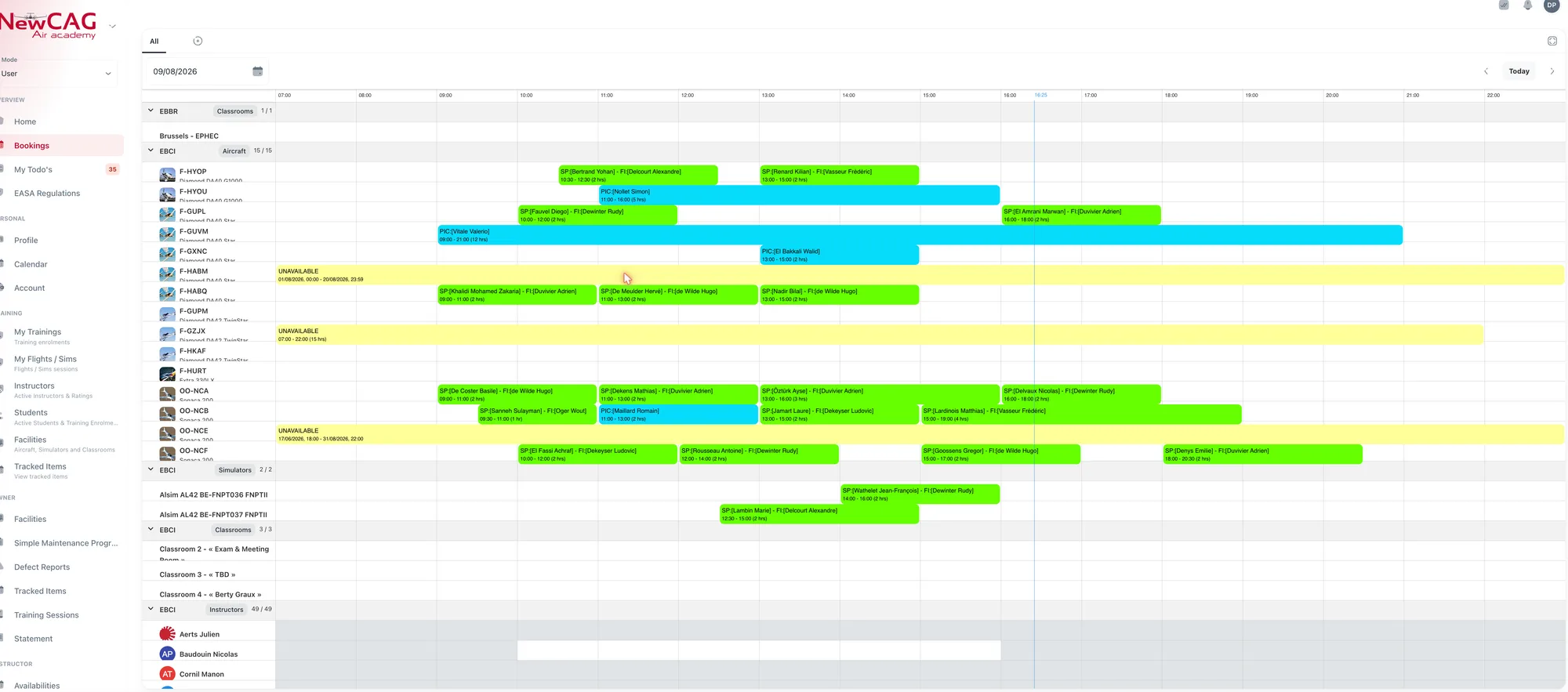
Aircraft, simulator, classroom and instructor schedule
A full operating day on a single grid. Every booking carries its student and instructor; maintenance downtime runs on the row of the aircraft concerned, and validity checks run before a booking is allowed to exist.
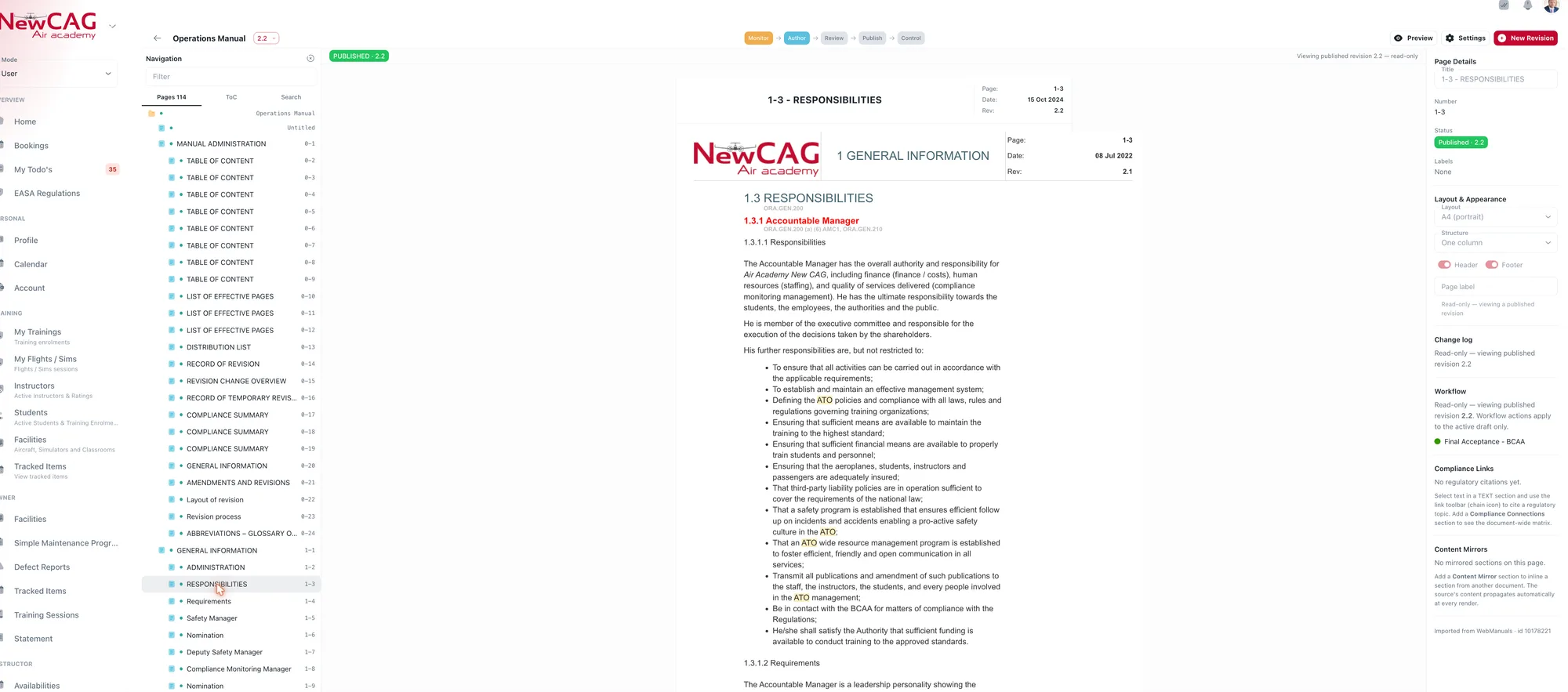
Controlled operations manual
One page of the operations manual at published revision 2.2, out of 114. The state chain — author, review, publish, control — sits at the top of the page, and regulatory citations are attached to the paragraph they justify.
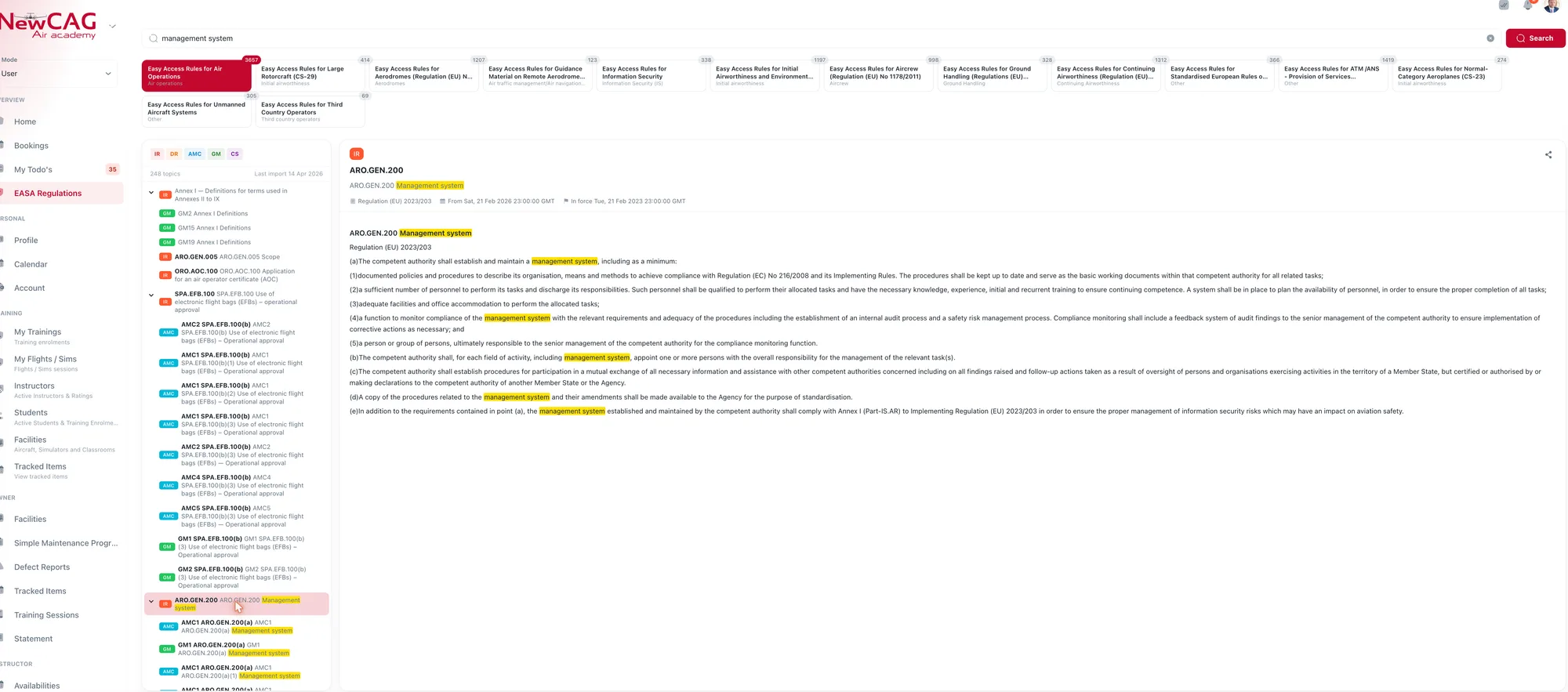
EASA regulatory corpus
Full-text search across the Easy Access Rules. Every hit is classified by nature — implementing rule, acceptable means of compliance, guidance material, certification specification — and the consolidated text carries its entry-into-force date.
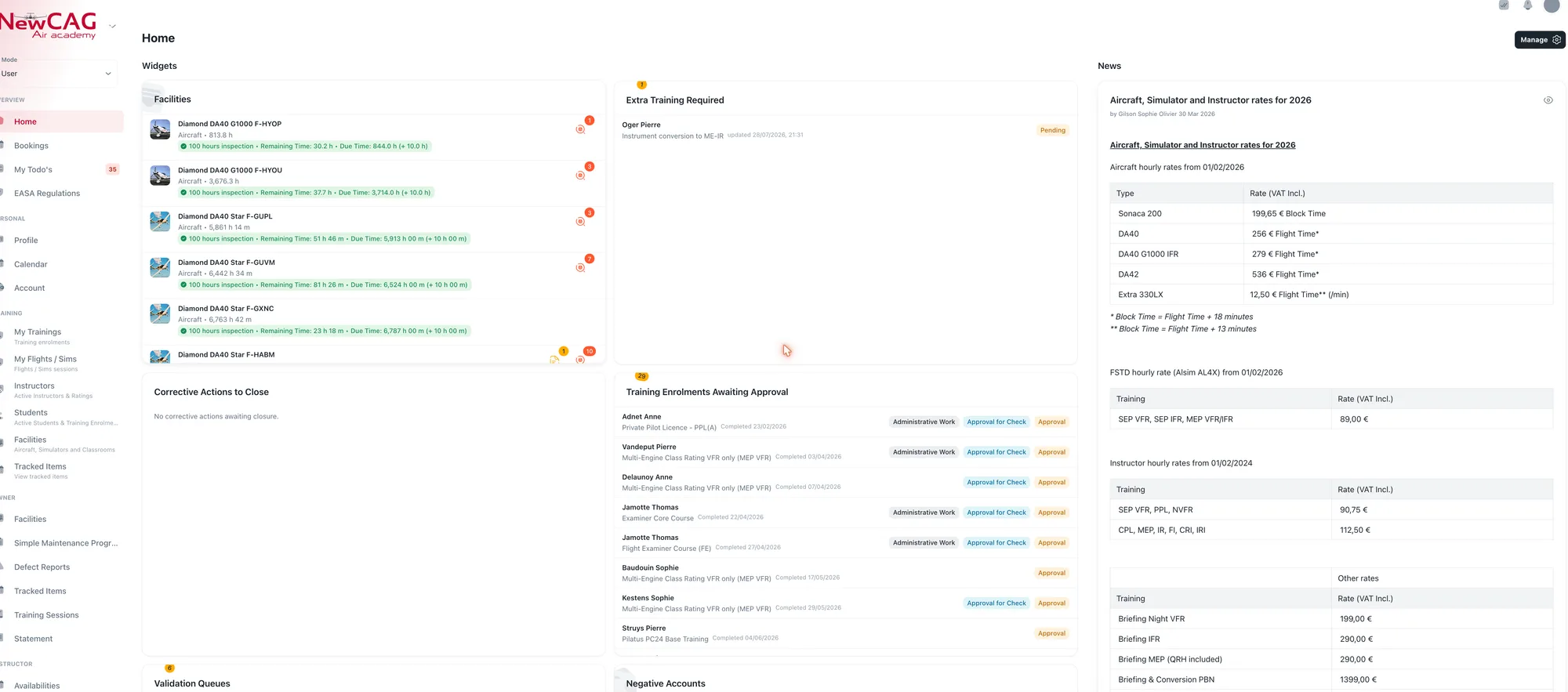
Organisation dashboard
What needs a decision today: remaining potential before the next inspection for each aircraft, additional training to schedule, enrolments awaiting approval, corrective actions to close, accounts in debit.
Origins
Eighteen years in the field, one complete rewrite
FlyMate did not come out of a requirements document but out of an operation. The first version — FlyMate Legacy — was developed in 2008, put into production at Air Academy New CAG in 2010, then maintained and used without interruption until December 2025.
Those fifteen years of daily use served as the specification. The new FlyMate was completely rewritten on a modern technical stack and designed from the outset to be multi-operator: each organisation gets its own subdomain, visual identity, isolated data and subscribed modules. It went into production on 1 January 2026.
- 2008
- FlyMate Legacy developed — the first version of the software
- 2010
- Put into production at Air Academy New CAG
- 2025
- Legacy retired after fifteen years of continuous service
- 2026
- New multi-operator FlyMate enters production
Functional scope
The scope, module by module
Each organisation activates the modules it subscribes to. The others stay invisible — in the web application as on mobile.
01 Operations
- Booking
- A single schedule for fleet, simulators, classrooms and instructors, by base. Drag-and-drop creation, operational colour coding, instructor-declared availability. Every booking is validated before it exists: valid and scanned medical, language proficiency, class and type ratings, model check-out, recency, daily quotas, minimum rest time, sufficient account balance, training record prerequisites. Authorised managers can override — and every override is logged. Late cancellations require a reason, are reviewed by staff, and trigger a progressive penalty scale with automatic debit.
- Fleet
- Reference data for aircraft, simulators and classrooms, structured into aircraft classes and types linked to EASA categories. Access restricted by licence category or by named pilot list, multiple configurations per simulator, FSTD qualification carried through to certificates. Read-only owner area showing remaining potential, open defects and a twelve-month annual activity report.
- Maintenance
- Digital technical logbook per aircraft. Defect reporting by the crew with photos, immediate alert to maintenance staff, full defect lifecycle through AOG and MEL deferral, follow-up journal reserved for the workshop. Maintenance programme per counter with hourly or calendar due dates, tolerances, traced deviations and a five-level remaining-potential indicator. Tracking of documents and life-limited items: ARC, insurance, flight manual, life-limited components.
02 Training
- Training
- Syllabi described once and reused: phases, modules, flights, exercises, ground courses, minimum durations, required documents, authorised aircraft and instructors. Individual tracking of each enrolment against regulatory minima, at-risk student dashboard, debriefing and exercise-by-exercise grading with PIN electronic signature, blocking corrective actions, full theory management — cohorts, attendance, progress tests, examinations. Full PDF export of the record for audit, watermarked until approved.
- Licences and credentials
- Digital document wallet for each pilot: licences, ratings, multi-class medical certificates with their Part-MED limitations, language proficiency, instructor and examiner certificates, travel documents. Data entered alongside the scan displayed on screen, successive revisions without overwriting history, and optional four-eyes verification that makes a checked document immutable.
- Training documents and certificates
- Generation of official documents from the organisation’s own templates, up to four independent signature slots, holder → deputy → signature delegate chain, traceable revocation and a documents-to-sign queue. Two-page course completion certificate including the EASA sheet, KSA Area 100 certificate, theoretical knowledge certificates issued by the CTKI.
03 Compliance and safety
- Documentation
- Aviation-grade document management: OM-A/B/C/D, MOM, training and quality manuals. Three-pane editor with manual-style pagination, thirteen automatically generated section types — table of contents, list of effective pages, change log, regulatory cross-reference matrix, content mirror. Immutable revisions with full snapshots, revision bars in the margin, per-page approval workflow with PIN signature and four-eyes rule, PDF publication, read receipts with a follow-up dashboard. Dedicated read-only roles for auditors and the national authority.
- Regulatory monitoring
- Built-in library of EASA Easy Access Rules, browsable as a table of contents and searchable in full text across all publications at once. Clickable cross-references between publications, regulatory metadata, deep links to a specific rule. A daily automated watch detects revisions published by the Agency, imports them, and raises one alert per amended rule with its criticality level and the number of manual paragraphs affected.
- Compliance monitoring
- The organisation’s compliance monitoring function: a multi-year audit plan covering the regulatory domains, planning and conduct of internal and external audits, recording of findings with their level, and tracking of corrective actions through to closure — root cause, owner, due date, evidence of implementation and effectiveness check. Dashboard of open, overdue and recurring findings, and an audit file that can be assembled for the national authority.
- Safety (SMS)
- Safety management system: hazard and risk register with severity × likelihood scoring, acceptability matrix and mitigation measures. Collection of air safety reports (ASR) from the field and notification to the competent authority through the ECCAIRS 2 platform in E5X format — a zipped XML archive compliant with the ICAO ADREP taxonomy, as required by Regulation (EU) No 376/2014. Conduct of investigations, issuing of safety recommendations and follow-up of their implementation, safety management review and performance indicators.
- Read & Sign
- Distribution of notices and safety bulletins with mandatory signed read receipt, blocking access to the application until the recipient signs with their PIN. Targeting by airport, aircraft, role group, training record or even a specific flight lesson, with automatic enrolment of new joiners. Configurable postponement policy, periodic re-signature, annual revalidation by the owner, per-recipient progress dashboard.
04 Business
- Accounting
- One client account per person or company, with balance, history and automatic monthly invoicing of flights. Temporary balance accounting for flights not yet invoiced, individual authorised credit, booking blocked when funds are insufficient, automatic reminders for accounts in debit. Supplier statements for aircraft owners and monthly instructor statements, credit notes, landing fees, fuel reimbursements against receipt, SEPA QR code on every invoice.
- Rates
- Per-minute price catalogue for aircraft, simulators and instructor time, with selling price, owner purchase price and platform provision. Prepaid training packages drawn down automatically, validity periods, tiered rates, rates restricted to specific clients. The engine values every session without intervention and flags the impact of a price change on sessions not yet invoiced.
- Pilot Shop
- Club shop point of sale, linked to the client account: hierarchical catalogue, items and kits, dated price lists, multiple selling units, stock computed from the movement ledger, supplier deliveries with currency and exchange rate. Confirming a sale generates the accounting entry automatically, as an account debit or a numbered invoice depending on VAT rates.
- Statistics
- Eight dashboards — flight hours, maintenance, training, accounting, instructors, fleet, students, client funds — with a shared period selector, automatic comparison against previous periods and breakdown by instructor, aircraft, student or programme. Margins decomposed by nature, fleet utilisation rate, instructor productivity, and composition of tailored PDF reports.
05 Platform
- Operator settings
- Complete visual identity for the organisation — vector logo, PDF logo, authority logo and six colour ranges in six shades each, applied immediately to the interface, charts and emails. Numbering schemes for accounting documents, invoicing defaults, notification addresses, booking safeguards, ATO regulatory identifiers and post holder nominations with deputies and signature delegates.
- User management
- Directory, four-step invitation with a secure link, and permissions managed through role groups — never assigned individually. One account can belong to several organisations with different rights in each. Two secrets per user: a login password and a signature PIN. iCal calendar subscription, anonymous mode in audit trails, removal from an organisation without deleting the account.
- Tasks and announcements
- Task assignment to people, teams, post holders or the students of a ground lesson, with conversation, attachments, priority and due date. Internal announcement feed on the home page, targeted by role group, distinct from controlled manuals and signature notices.
Mobile application
Native iOS, built to work without a network
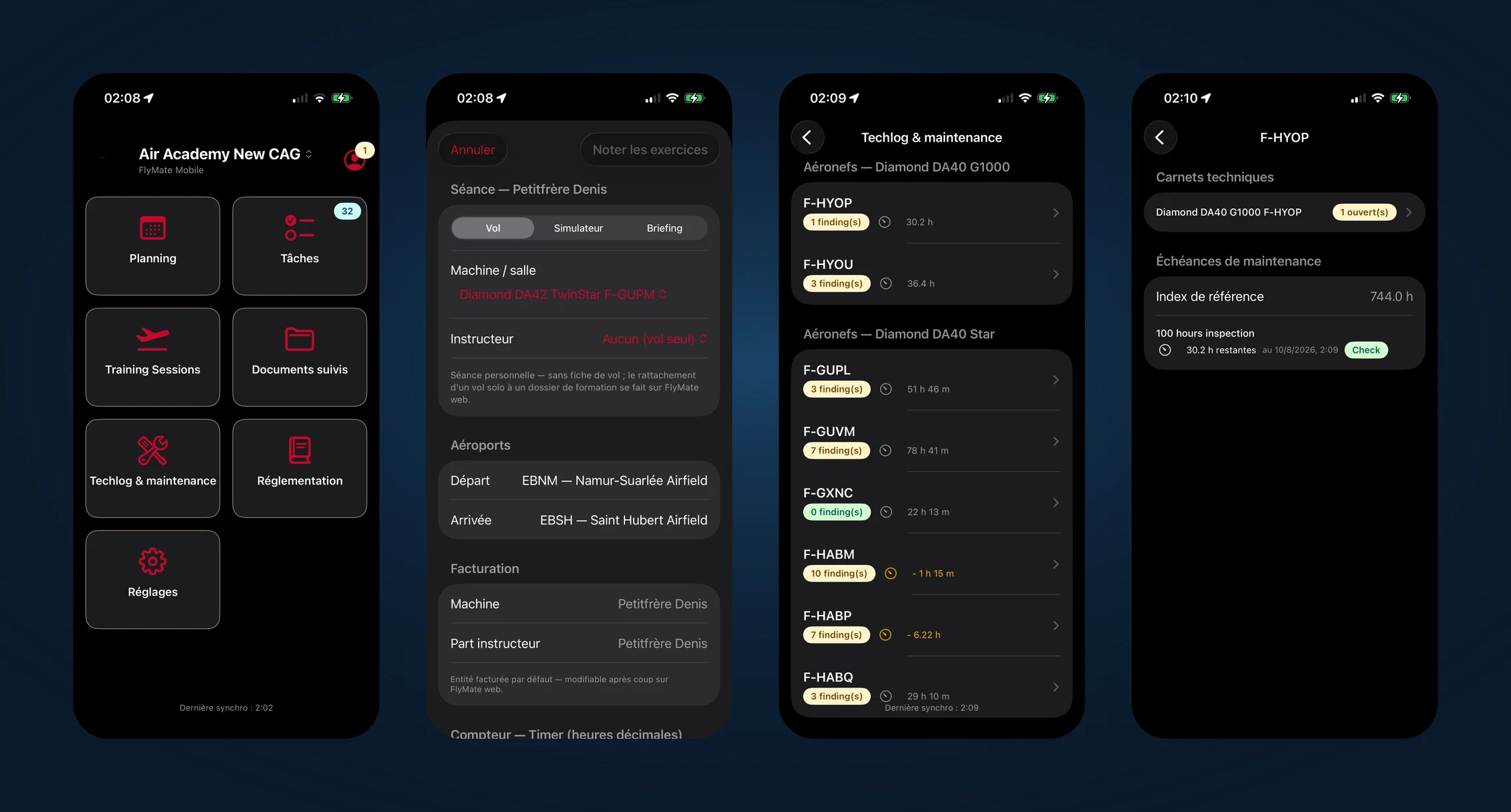
The iOS application takes the platform into the field, where connectivity is unreliable: on the apron, in the briefing room, at an aerodrome with no coverage. It is local-first — the interface reads and writes a local database, and a sync engine reconciles with the server as soon as the network returns.
Offline writes are queued idempotently: they survive the app being closed, respect dependencies between objects, and are never sent twice. A server rejection never causes a silent overwrite: the server state is shown alongside the local copy, to be carried over or discarded.
- Full offline entry of a training session: exercise grading, debriefing and signatures.
- Records of scheduled students: progress by exercise, hours achieved against minima, past sessions.
- Schedule in agenda or list view, bookings and ground lessons.
- Personal documents: licences, medical certificates by class, travel documents, with scan capture.
- Account: timestamped balance and six months of movements.
- Technical logbooks per aircraft: open findings, next due date, remaining potential.
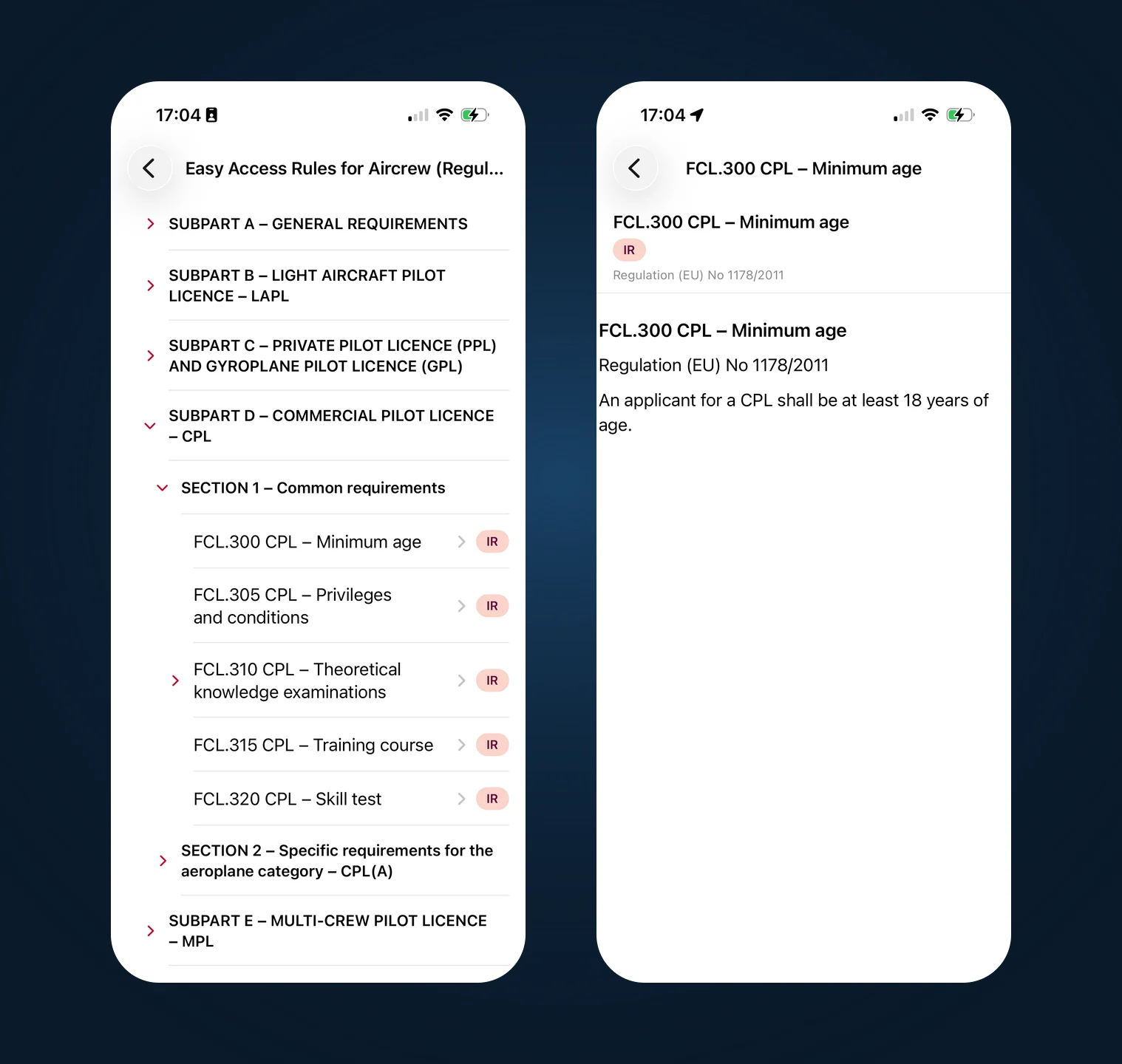
- EASA regulatory corpus downloadable for offline reading, with local full-text search.
- Tasks and conversations fully usable without a network.
Security: tokens in the Keychain, encrypted local database, reinforced protection for licence and medical scans, PIN unlock, limited offline window, and complete data purge on sign-out.
Technical foundation
What FlyMate is built on
The 2026 rewrite had three goals: support several organisations on one platform, carry the documentary and regulatory load of an ATO, and make the operation usable from a phone with no network.
- Architecture
- Multi-operator: one subdomain, visual identity, storage space and set of subscribed modules per organisation, with data partitioning at every layer.
- Backend
- Grails 6.2 on Groovy and Spring Boot, GORM/Hibernate, JSON views, MySQL database.
- Frontend
- React 19 with TypeScript, Vite build, MUI 7 component library.
- Mobile
- Native iOS in Swift 6 with SwiftUI and SwiftData, iPhone and iPad, iOS 18 minimum, no external dependencies.
- Authentication
- Encrypted JWT tokens, permissions recomputed per organisation on every read, separate PIN for signatures.
- Storage
- Amazon S3, one space per organisation, access through short-lived signed URLs.
- Documents
- Server-side PDF generation for manuals, training records, certificates, invoices and reports.
- Integrations
- Transactional email in the organisation’s livery, iOS push notifications, iCal calendar feed, SEPA payment QR code, import from an existing document management platform.
What sets FlyMate apart
An aircraft schedule is not a calendar. It must account for engine time remaining, licence and rating validity, instruction slots, weather, maintenance downtime and priority rules between members. A general-purpose tool discovers those constraints after go-live; FlyMate enforces them by design, because it was written inside a flight school.
The counterpart to that density is traceability. PIN signatures, immutable revisions, publication snapshots, audit trails, watermarks on unapproved documents: what FlyMate produces is made to be shown to an auditor or to the national authority.
FAQ
Frequently asked questions
Who is FlyMate for?
Approved (ATO) and declared (DTO) aviation training organisations, as well as operators, flying clubs and co-ownership structures that need to coordinate a fleet, instructors, students and client accounting.
How long has FlyMate existed?
The first version, FlyMate Legacy, was developed in 2008 and put into production at Air Academy New CAG in 2010, then used until December 2025. The new FlyMate, completely rewritten and designed to be multi-operator, entered production on 1 January 2026.
Is FlyMate multi-operator?
Yes, by design. Each organisation has its own subdomain, visual identity, storage space and subscribed modules, with strict data partitioning. One user account can belong to several organisations with different rights in each.
Does FlyMate work without a connection?
The iOS application is local-first: reading and data entry work offline, including full entry of a training session, and synchronisation happens when the network returns without loss or duplication. The web application requires a connection.
Can an existing document library be migrated?
Yes. The Documentation module includes an importer for an existing WebManuals environment — manuals, pages, revisions, media, abbreviations, definitions, designs and workflows.
Where can FlyMate be found?
FlyMate is presented at flymate.app. The software is published by MSDP, which handles development, hosting and support.
Next step
A project, a mandate, a question?
Describe your situation in a few lines. You get a reasoned answer, usually within two working days — including a frank view on whether an engagement is warranted at all.